Buyer’s Guide: The Best IT Change Management Tools for 2026

Picture this: your IT team spends weeks planning a cloud migration, moving critical applications off aging on-premises servers. The architecture is solid. The window is approved. Then the change begins, and three dependent services you never mapped go offline with it.
This plays out in organizations every day, and the common denominator is almost never the change itself. It is the absence of reliable context: which systems depend on what, who owns them, and what breaks if something shifts.
That is the problem IT change management tools exist to solve. At their best, they turn risky changes into structured, traceable, repeatable steps, with approvals, dependency checks, and stakeholder communication built in. At their most useful, they connect to a CMDB and a dependency visualization layer that shows the likely impact of a proposed change before it is approved.
Why 2026 Raises the Stakes
In 2026, the cost of poor change management reaches beyond downtime and ticket volume. As IT teams introduce AI-assisted automation and agentic workflows, every change carries an added risk: disrupting the data pipelines and service maps those agents depend on to act correctly. Getting change management right is no longer only about protecting uptime. It is about keeping the operational truth your AI systems rely on accurate, complete, and governed.
Industry research has long pointed to process discipline as the deciding factor. Gartner’s Donna Scott has stated that about 80 percent of unplanned downtime traces back to people and process issues, including poor change management practices, with the remainder caused by technology failures and disasters. For enterprise organizations, every hour of downtime can mean significant direct losses, eroded customer trust, and compliance exposure.
That is why choosing the right IT change management tool matters. This guide helps you evaluate the leading platforms and find the right fit for your environment, then explains how pairing any of them with discovery-driven configuration data gives your change process a defensible foundation.
What Are IT Change Management Tools, and Why Do They Matter?
IT change management tools help teams plan, track, and approve changes to IT infrastructure and services, supporting transparency, auditability, and accountability at every step.
A change in this context can mean applying a security patch, upgrading a server, deploying new software, migrating data to the cloud, or modifying a network configuration. Without a structured process, any of these can cascade into unplanned outages or compliance violations.
Change management tools guide teams through clear approval steps so nothing is missed. Many follow ITIL’s Change Enablement framework, which classifies changes by risk and defines who must approve them before execution begins. For a deeper look at how the configuration database underpins this, see how a CMDB helps in change management.
Key Features of IT Change Management Tools
Central change request system. A single place to log, track, and audit all change requests, replacing email threads and spreadsheets with a structured record.
Approval workflows. Structured review steps, including Change Advisory Board (CAB) sign-off, before any change moves to implementation.
Risk and impact checks. Often connected to CMDB data to show how systems relate and what the likely impact of a change looks like before it is approved.
Scheduling tools. Plan changes at the right time, avoid conflicts between simultaneous change windows, and track implementation against the schedule.
Communication features. Alert the right stakeholders, technical teams, business owners, and customers, about upcoming changes and their potential impact.
Benefits of IT Change Management Tools
When implemented well, change management tools deliver several measurable outcomes:
- Fewer service disruptions during upgrades, migrations, and patches
- Early conflict detection before two changes step on each other
- Testing gates that hold changes back from going live before validation
- Lower compliance risk through complete audit trails
- Stronger accountability when changes cause unexpected side effects
With the right platform in place, teams shift from reactive firefighting toward structured, repeatable execution.
How to Choose the Best IT Change Management Tool
The right IT change management tool depends on your organization’s size, complexity, risk profile, and the platforms already in your IT ecosystem. The best IT change management tools share a few traits, but the right fit comes down to the factors that matter most below.
1. Time to Value and Ease of Implementation
Evaluate how long onboarding takes and what training is required. Some platforms deploy in days; others take months of configuration work. If your team lacks dedicated ITSM administrators, weigh the operational cost of a complex setup against its feature advantages.
2. Fit for Business Size and Complexity
Small and mid-sized businesses typically need simple, affordable tools with fast adoption curves. Larger enterprises need compliance reporting, multi-site support, and deep integrations across a broader technology ecosystem. Verify that licensing terms let you grow without hitting paywalls. A tool that works at 50 users should still work at 500.
3. Workflow Automation and AI Capabilities
Automation handles routine approvals and repeated tasks faster than manual review. Some platforms use AI to generate risk scores or suggest approvals based on historical patterns. Before selecting a tool, confirm which automation features are included in your plan tier versus sold as add-ons.
4. Integration With Your IT Ecosystem
The best change management tools connect with your ITSM platform, DevOps pipelines, monitoring systems, and CMDB. Adding a tool like Virima brings discovery-driven CI relationships and ViVID™ service mapping into the picture, giving change managers a visual layer that shows which assets, services, and teams sit in the path of any planned change.
5. Cost, Licensing, and Support
Evaluate the total cost of ownership. Look at how license costs scale with team size, and whether add-ons are optional or required to reach the feature set you need. A vendor that offers strong onboarding support and regular product updates is often worth a premium, because weak support compounds every implementation challenge.
Top 6 IT Change Management Tools: Overview and Comparison
If you lead IT operations or service delivery, you know that poorly managed changes carry real costs. Across industries, the compounding cost of failed changes, including downtime, rework, compliance exposure, and lost productivity, makes platform selection a high-stakes decision.
Below are six leading IT change management tools, each with its own strengths, trade-offs, and fit profile.
1. ServiceNow Change Management
ServiceNow is one of the most widely adopted ITSM platforms for enterprise change management. It follows ITIL best practices and provides structured workflows for standard, normal, and emergency changes, giving teams a documented, auditable record from request through post-implementation review.
For organizations that cannot risk service disruptions, ServiceNow’s combination of CAB governance, CMDB integration, and compliance logging makes it a reliable anchor for enterprise-scale change programs.
Features
- Workflows for all change types: standard, normal, and emergency, with consistent, repeatable processes
- CAB Workbench: a centralized tool for running Change Advisory Board meetings with agendas, approvals, and decision records in one place
- Risk and impact analysis: connects with CMDB data to map dependencies and surface risks before any change is approved
- Customizable templates: speed up requests and approvals for routine, recurring changes
- Dashboards and analytics: pending approvals, failed changes, and change success rates in a single view
- Full lifecycle visibility: connects change management with incident and problem records for end-to-end traceability
- DevOps integration: links with CI/CD pipelines for change approvals in agile delivery environments
- Virima ViVID integration: overlays change data onto visual dependency maps, adding impact visibility inside the ServiceNow interface. See the Virima ServiceNow integration.
Pros
- Scales for global enterprise environments with multinational complexity
- Automation reduces manual effort across approvals, risk checks, and reporting
- Strong integration across ITSM modules: incidents, problems, assets, and changes in one platform
- Advanced analytics with KPI tracking, including change success rate and mean time to recovery
- Compliance and audit readiness with detailed logs for every change event
- Extensive partner ecosystem with integrations and plugins across industries
Cons
- High total cost of ownership; licensing, customization, and implementation costs can be prohibitive for mid-sized organizations
- Steep learning curve; users benefit from ITIL knowledge and ServiceNow-specific training
- Long implementation timelines, often several months for full deployment and integration
- CMDB accuracy dependency; impact analysis and risk scoring are only as reliable as the underlying CI data quality
- Performance concerns with very large CMDBs, where queries and reports can slow under heavy data loads
- Customization overhead; deep customization adds maintenance burden and complicates upgrades
2. Jira Service Management
Jira Service Management, built by Atlassian, combines ITSM with agile project management. It suits organizations already using Jira Software, Bitbucket, or Confluence, where development and IT operations need to coordinate closely on change.
Change requests connect directly to code repositories and CI/CD workflows, which speeds up much of the approval and deployment process while maintaining governance. Many mid-sized and agile-first organizations choose it for this reason.
Features
- Customizable workflows for different change types, flexible while maintaining governance structure
- Risk scoring to evaluate change impact and give CAB members clearer decision inputs
- Atlassian ecosystem integration with Jira Software, Confluence, and Bitbucket for cross-team collaboration
- CAB scheduling and tracking, with built-in meeting management, agenda sharing, and outcome logging
- Automation rules for approvals, notifications, and escalations that reduce manual handoffs
- CI/CD pipeline integration, linking change management directly to continuous integration and deployment workflows
- Reporting and dashboards covering change volume, approval times, and failure rates in a single view
- Virima integration: Jira Service Management connects with Virima’s IT discovery and CMDB platform for synchronized CI data, accurate dependency mapping, and change impact analysis inside the Jira interface. See the Virima Jira Service Management integration.
Pros
- Strong DevOps alignment that closes the gap between IT operations and development teams
- Familiar interface for Atlassian ecosystem users, with faster adoption and less training overhead
- Cost-effective for mid-sized organizations compared with enterprise-heavy ITSM platforms
- High flexibility through customizable workflows, fields, and automation rules
- Collaboration-focused design that brings IT, DevOps, and business stakeholders into the same workflow
- Faster setup than large enterprise ITSM platforms
Cons
- Less ITIL depth than ServiceNow or BMC for very large enterprise environments
- CAB management is functional but less advanced than dedicated enterprise change tools
- Scaling challenges for highly complex or geographically distributed IT environments
- Reporting limitations; advanced analytics often require add-ons or third-party integrations
- Heavy Atlassian ecosystem dependency; it delivers the most value alongside Jira Software, Bitbucket, and Confluence
3. Freshservice
Freshservice, built by Freshworks, is a cloud-native ITSM platform designed around simplicity without sacrificing ITIL alignment. It fits organizations that want fast deployment, a clean interface, and solid automation without the administrative overhead of heavier enterprise tools.
Its change management module helps reduce risk, improve coordination, and maintain governance. Freshservice works well for small and mid-sized businesses, and for larger organizations that want a lightweight ITSM layer alongside existing enterprise tooling.
Features
- Intuitive change request management with a clean submission and tracking interface that reduces training time
- CAB collaboration tools, including meeting scheduling, decision tracking, and approval management
- Workflows for change routing, approvals, and notifications that reduce manual bottlenecks
- Risk and impact assessment that surfaces potential dependencies and risks to support better planning
- AI-powered suggestions that flag risks, recommend best practices, and guide decisions during the change process
- Integration with incidents and problems, so changes link to related IT issues for accountability and lifecycle tracking
- Reports and dashboards covering approval times, failed changes, and CAB effectiveness
Pros
- Ease of use; the clean design reduces training time and improves adoption
- Quick implementation without heavy setup or complex configuration
- Affordable pricing that puts enterprise-grade features within reach of small and mid-sized organizations
- Strong automation that reduces the administrative burden on IT staff
- AI-driven insights that guide faster, better-informed decisions
- Cloud-native SaaS design with automatic updates and minimal infrastructure requirements
Cons
- Limited scalability for very large or highly complex global IT environments
- Less customizable than ServiceNow or BMC for organizations with specialized process requirements
- Fewer advanced ITIL features, with gaps that may appear in highly regulated industries
- Smaller integration ecosystem than Atlassian or ServiceNow
- Basic reporting compared with enterprise platforms that have advanced BI capabilities
- Requires consistent internet connectivity as a cloud-only solution
4. ManageEngine ServiceDesk Plus
ManageEngine ServiceDesk Plus is a widely used ITSM platform known for strong ITIL support at an accessible price point. Small and mid-sized organizations frequently choose it for the combination of structured change management and flexible deployment, without the cost or complexity of enterprise-grade platforms.
Features
- End-to-end change lifecycle management, from creation and assessment through approval, implementation, and post-change review
- Role-based approval workflows with multi-level chains based on change type, risk rating, and requester role
- CAB meeting management for scheduling meetings, setting agendas, and recording decisions in a central location
- Change categorization and templates to classify by impact, risk, and priority and standardize routine requests
- Integration with incident and problem management, linking changes to related records for full traceability
- Customizable rules that handle notifications, approvals, and escalations to reduce manual processing time
- Reports and dashboards tracking KPIs including change success rate, failed changes, and average turnaround time
Pros
- Affordable licensing that gives small and mid-sized organizations ITIL-aligned change management without enterprise-scale cost
- Flexible deployment with cloud-hosted or on-premises options based on infrastructure and data governance needs
- Strong integration across ITSM processes, linking incidents, problems, and assets to change records
- Customizable workflows that teams can tailor to internal policies without complex development work
- Easy adoption with a simpler interface and shorter learning curve than most enterprise platforms
- Scalable for mid-sized organizations without requiring enterprise-grade tooling
Cons
- Not built for very large global enterprises managing complex, distributed IT environments
- Limited advanced analytics; reporting is useful but less powerful than platforms with deep BI integration
- Customization limits; workflows are flexible, but deep customization takes more effort than in competing platforms
- Smaller integration ecosystem than Atlassian or ServiceNow
- Interface can feel dated compared with modern SaaS platforms
- Slower innovation cycle relative to cloud-native ITSM competitors
5. BMC Helix ITSM
BMC Helix ITSM is an enterprise-grade solution built for large organizations managing complex, multi-cloud environments. It offers ITIL-aligned processes, advanced automation, AI-driven insights, and predictive analytics, making it a direct competitor to ServiceNow for enterprises that need high scalability and compliance depth.
Features
- Comprehensive ITIL alignment across change, incident, problem, and asset management
- Cognitive automation that handles approvals, risk scoring, and recommendations to reduce manual effort
- Multi-cloud support for managing changes across hybrid and multi-cloud environments with consistent governance
- Advanced risk and impact analysis through tight CMDB integration that surfaces dependencies and likely impact before changes are approved
- Change templates and workflows that standardize recurring changes while allowing deep customization
- CAB collaboration tools for meeting management, approval tracking, and centralized decision records
- Predictive analytics that model potential change outcomes to improve planning and reduce failure rates
- Dashboards and KPIs covering change success, backlog, and business impact for IT leaders
Pros
- Enterprise-ready scalability that handles multinational environments with thousands of users and assets
- AI-powered insights that help organizations anticipate risks and act proactively
- Comprehensive compliance support with detailed logs and audit trails for regulated industries
- Strong multi-cloud governance across diverse IT infrastructures
- Deep customization that adapts workflows and templates to industry-specific requirements
- Detailed executive-level reporting for data-driven change decisions
Cons
- High total cost of ownership, with licensing, implementation, and customization costs comparable to ServiceNow
- Complex implementation that typically requires significant planning and specialized expertise
- Steep learning curve; advanced features demand extensive staff training
- Customization overhead that makes upgrades and maintenance more complicated
- Performance depends on CMDB data quality; stale or inaccurate CI data undermines risk scoring
- Not well suited for smaller organizations with limited IT budgets and staffing
6. TeamDynamix
TeamDynamix (TDX) is a modern ITSM and enterprise service management platform that combines change management, service desk, and project portfolio management (PPM) in a single interface. It is widely adopted in higher education and is growing across enterprise IT departments that want tighter alignment between IT service delivery and project execution.
Its change management module follows ITIL principles while staying accessible to teams without a dedicated ITIL practice. The integration with Virima adds discovery-driven CI data and ViVID™ dependency mapping to the TeamDynamix change workflow.
Features
- ITIL-aligned change workflows for standard, normal, and emergency changes, with role-based approvals and CAB governance
- Change and project integration that links changes to project tasks in the PPM module for a single view across delivery and execution
- Risk and impact assessment that flags high-risk changes based on CI relationships and historical change data
- Change categorization and templates to classify by type, impact, and risk with reusable templates
- CAB management for scheduling, agenda management, and approval tracking in a centralized workspace
- Workflow rules that handle routing, notifications, and escalations to reduce manual overhead
- Dashboards that track change success rate, approval cycle times, and risk distribution across active change windows
- Virima integration: TeamDynamix connects with Virima’s CMDB and ViVID™ service mapping for discovery-driven CI data and visual impact analysis inside the TDX change workflow. Browse all Virima ITSM integrations.
Pros
- Combines ITSM and project portfolio management, which is useful for organizations managing change alongside active delivery programs
- Modern, clean interface with lower training overhead than ServiceNow or BMC
- Moderate cost relative to enterprise-grade platforms, with strong value for mid-market organizations
- Active product roadmap with regular feature releases
- Native Virima integration for CI data accuracy, dependency mapping, and impact visualization
- Strong fit for higher education, healthcare, and enterprise mid-market environments
Cons
- Less recognized than ServiceNow or Jira in broad enterprise markets, with a smaller peer community and fewer third-party resources
- Smaller integration ecosystem than Atlassian or ServiceNow
- Advanced automation requires deliberate configuration and does not ship at the same out-of-the-box level as ServiceNow
- AI-driven risk features are less mature than BMC Helix or ServiceNow’s cognitive capabilities
- May not match ServiceNow or BMC for very large, globally distributed organizations with complex compliance requirements
ITIL Change Management Tools: Quick Comparison
| Tool | Best for | Ease of use | Setup time | Key strengths | Cost |
| ServiceNow | Large enterprises | Complex | Months | Enterprise scale, deep integrations, ViVID overlay | Very high |
| Jira Service Mgmt | Agile / DevOps teams | Easy | Weeks | Agile workflows, fast setup, Virima integration | Low to moderate |
| Freshservice | SMB and mid-size | Intuitive | Weeks | Affordable, AI assistant, quick adoption | Affordable |
| ManageEngine SDP | Cost-conscious orgs | Moderate | Weeks to months | Balanced features, ITIL-aligned | Cost-effective |
| BMC Helix ITSM | Large enterprises | Complex | Months | Predictive analytics, multi-cloud governance | Very high |
| TeamDynamix | Higher ed, public sector | Moderate | Weeks to months | ITSM plus PPM, Virima integration, modern UI | Moderate |
Strengthening Change Management With Virima’s Discovery-Driven Visual Intelligence
No matter which change management tool you select, it is only as reliable as the data feeding it. Approval workflows, risk scoring, and impact analysis all depend on one thing: accurate knowledge of what exists in your environment, how it connects, and what breaks if something shifts. Virima provides that operational truth, sourced from discovery, explainable, and governed.
Virima does not replace your ITSM platform. It works alongside it, feeding verified CI relationships and ViVID™ service mapping into your change process so every decision is grounded in current infrastructure reality, not stale spreadsheet data.
The impact question every change manager should ask: before this change is approved, do I know every CI, service, and team that could be affected if something goes wrong? Virima helps you answer that question. Here is how.
1. Verified, Discovery-Driven Configuration Data
Virima runs high-frequency discovery cycles across your IT assets, including servers, applications, databases, network devices, and cloud instances on AWS and Azure, and populates your CMDB with verified CI data. Every change you plan is backed by discovery-sourced ground truth rather than manually entered records that drift over time. Learn more about Virima IT Discovery and how Virima CMDB supports change management.
Industry best practice calls for a trusted configuration baseline as the foundation of any change process. Virima maintains that baseline through recurring scheduled discovery and CI verification, so the list of impacted systems you review before a change is current rather than months out of date.
2. Visual Impact Analysis
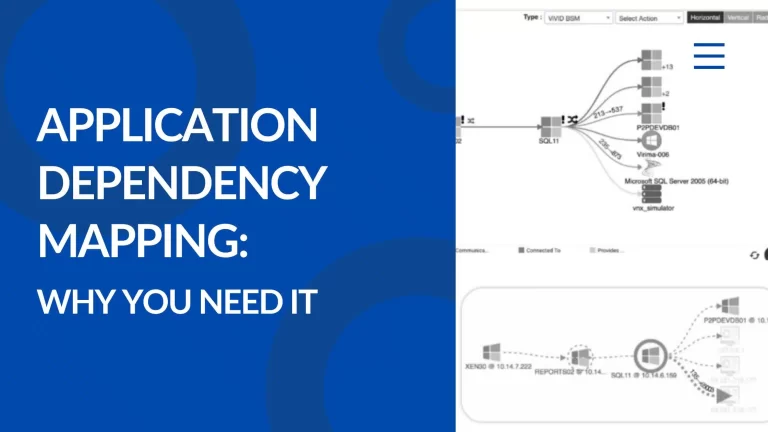
One of Virima’s most distinctive capabilities is ViVID™ (Virima Visual Impact Display), an interactive dependency map of your IT service environment. When integrated with ServiceNow, Jira Service Management, Ivanti, Halo, Xurrent, or TeamDynamix, Virima overlays change records directly onto these maps.
Before a change is approved, ViVID shows the affected scope: the downstream CIs, business services, and teams that could be touched if the change goes wrong. A database server upgrade might affect three applications, two business services, and four dependent teams. With ViVID, that picture is visible before the change advisory board meets, not after an outage begins. For a closer look at building these views, see this step-by-step guide to service dependency mapping.
This visual context gives stakeholders the evidence they need to approve changes with confidence rather than assumptions. It also makes it easier to communicate risk to non-technical business leaders who need to understand impact without reading infrastructure diagrams.
3. Change Collision Detection
With Virima service maps in place, your team can identify when multiple changes target related or interdependent systems. The platform highlights potential overlaps, for example two teams scheduling reboots on interdependent servers during the same maintenance window.
By catching these collisions before the change window opens, you help prevent combined outages that neither team anticipated individually. ViVID visualizes the combined impact when two changes overlap, giving change managers a single view of total risk exposure across concurrent change windows.
4. Risk Scoring and Post-Change Validation
Virima’s analytics integrate with your ITSM platform to add data-driven risk assessment to the change workflow. When a proposed change targets mission-critical systems or matches patterns associated with past incidents, Virima flags it for elevated review before the CAB meeting.
After implementation, Virima runs discovery scans to validate that the configuration matches the expected post-change state. When configuration drift is detected, meaning the system state does not match the approved change plan, the platform alerts the responsible team. This validation helps close the loop between planning and reality, catching side effects that change plans do not anticipate before they compound into larger incidents.
5. Faster Troubleshooting and Rollback Planning
When a change causes unexpected problems, Virima’s dependency maps speed up root cause analysis. Teams can see which component in the service chain is the likely source of the disruption rather than working backward through logs. For rollback planning, Virima identifies the components that need to be reversed and can model the impact of that rollback to confirm nothing else will break in the process. This foresight helps reduce mean time to repair and gives teams a safer path to recovery. For a practical walkthrough, see how CMDB and ViVID support change management.
6. Stakeholder Confidence Through Visual Evidence
Adding Virima gives every stakeholder, technical teams and business leaders alike, a clear visual story of what is happening in the IT environment. Business leaders who can see the likely impact of a change are more willing to approve necessary changes because they see the risk management in action rather than only hearing about it. Pairing this with Virima IT Asset Management gives those same stakeholders ownership and lifecycle context alongside the dependency view.
This transparency reduces the friction between IT and business units that often slows change programs. In an environment where digital transformation moves quickly, organizations that approve and execute changes with documented evidence have a structural advantage over those still relying on manual impact spreadsheets.
| See it in your environmentWant to see how Virima fits your change management process? Schedule a demo at https://staging.virima.com/request-demo to see ViVID impact visualization and discovery-driven CMDB accuracy in action. |
From Change Control to Competitive Advantage
Once you have selected the right IT change management tools for your environment, the next question is what feeds them. An ITSM platform is the process engine. Virima provides the discovery-driven operational truth, explainable and governed, that helps make every change decision defensible.
Together, they can turn change management from a governance overhead into a strategic capability: structured, safer, and faster. That combination matters most for IT teams operating in a world where agentic automation is moving from a future state into daily practice.
| Ready to strengthen your change process? Request a demo at https://staging.virima.com/request-demo and see how discovery-driven service maps surface change impact before it reaches production. |